Zunqerai
Frame Library
Frame Library
Couldn't load pickup availability
- Problem Statement
Many learners reach a point where the basic database terms are familiar, but larger examples still feel difficult to read. A small table may seem understandable, while a group of connected tables can feel scattered. Learners may also know what a key is, but still feel unsure about how keys shape relationships between records. Query requests can become harder when they include more than one condition, several fields, or information from related tables. Frame Library is created for this stage, where learners need a broader study set that connects planning, reading, and practice in one organized course tier.
- Solution
Frame Library gives learners a more detailed set of database materials built around structure and repetition. The course explains database planning through examples that move from rough notes into cleaner table designs. It also gives learners more practice with keys, relationships, filtering, sorting, and reading query goals. Each section is written to help learners study one idea, see it in a sample, and then apply it through a task. This tier is useful for learners who want a larger reference-style course layer while still keeping the wording calm and clear.
- What’s Inside
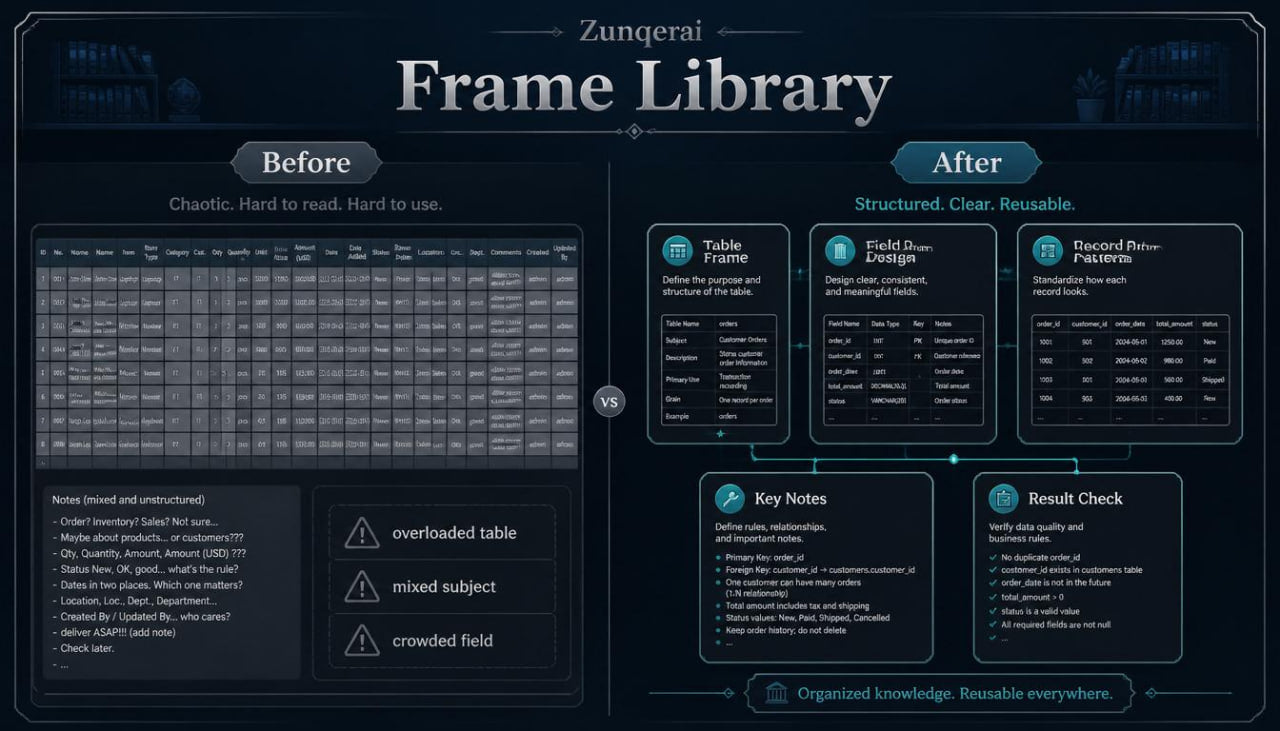
Frame Library includes a detailed collection of database study materials arranged around planning, structure, relationship reading, and query interpretation. The tier begins with a guided review of core database ideas, but the review is not just a repeat of earlier topics. It asks learners to look at tables as designed structures with a purpose, not only as rows and columns. A table is presented as a frame for one subject, and every field inside that table should help describe records related to that subject.
The first major section focuses on table framing. Learners study how to define the main subject of a table before listing fields. The materials show examples of table subjects such as learners, books, tasks, categories, lessons, orders, notes, locations, and events. For each example, learners are asked to think about what belongs inside the table and what should be moved elsewhere. This helps learners see why planning matters when information starts to grow.
The next section explores field design in greater detail. Learners examine field names, field meanings, and field consistency. A field should describe one kind of information, such as a date, title, status, number, description, or reference value. The materials explain why one field should not hold several unrelated details at the same time. Learners review examples where a field is too vague, too crowded, or placed in the wrong table. Practice prompts then ask learners to rewrite fields into clearer forms.
Frame Library also includes a structured section on records. Learners study how each record should follow the same pattern as other records in the table. The course explains how inconsistent records can make a database harder to read. For example, a status field should not use several unrelated labels for the same idea. A date field should follow one clear format within the study example. The materials do not focus on strict technical rules only; they focus on why steady structure makes later querying and review more understandable.
A wider section is dedicated to keys. Primary keys are explained as stable identifiers for records. Foreign keys are explained as reference values that point toward records in another table. Learners study several examples where keys create a connection between tables. These examples show how a learner record may connect to task records, how a category may connect to several entries, or how an order may connect to related order lines. The materials help learners notice where the key is stored and what it refers to.
The course then moves into relationship frames. Learners study one-to-one, one-to-many, and many-to-many relationships using written table sketches. The section explains each relationship type through simple questions: Can one record connect to one record? Can one record connect to several records? Can several records connect to several other records? Learners see why a linking table may be needed when many records connect on both sides. The examples are kept practical and focused on database thinking.
Frame Library also includes a section on table separation. Learners study examples of crowded tables and learn how to divide them into smaller, cleaner structures. The materials explain repeated groups, duplicated values, mixed subjects, and long fields that contain several pieces of information. Learners then practice deciding whether information belongs in the current table or another related table. This section is useful because many database mistakes begin before queries are written.
The query part of Frame Library is broader than in earlier tiers. Learners begin with plain questions and then break them into parts. A query request may ask which records should be shown, which fields should appear, which conditions should narrow the result, and how the result should be arranged. The materials explain that a query is a request for a particular view of stored information. The stored table remains the source, while the query result is the selected view.
Filtering is explained through several example types. Learners see how filters can match a category, check a status, compare a number, read a date, or combine more than one condition. The course explains the difference between a single condition and combined conditions. Learners practice reading statements such as “show records with this category and this status” or “show records after this date.” The examples remain at a learning level and do not become overloaded with formal syntax.
Sorting is covered as a separate topic and then combined with filtering. Learners study how records can be arranged by date, name, number, category, or status. They also study how sorting changes the result order without changing the stored records. Practice tasks ask learners to choose the correct sorting field for different query goals.
Frame Library introduces the idea of result reading. Learners are asked not only to create a query request, but also to inspect what the result would show. This part helps learners connect a database question with the output. They practice answering questions such as: Which fields should appear? Which records should be excluded? Which order makes the result easier to read? What relationship is being used?
Another section focuses on database notes. Learners are shown how to write simple notes for a table, field, key, or relationship. These notes can describe why a table exists, what each field means, and how another table connects to it. This is useful for study because it encourages learners to explain database choices in plain language.
Frame Library also includes recap blocks after each main topic group. These recap blocks summarize table framing, field design, keys, relationships, filtering, sorting, and result reading. A glossary section is included with clear wording for database terms used across the tier. Practice tasks appear throughout the materials, not only at the end, so learners can pause and apply the topic they just studied.
The closing part of the tier includes a guided database outline. Learners follow a sample information set from rough notes into tables, fields, keys, relationships, and query questions. This final example brings the course tier together and gives learners a full study model to review.
- Who Is This For?
Frame Library is for learners who want a broader database study tier with more structure than the earlier levels. It is suitable for people who already understand tables and keys at a basic level, but want more practice with table planning, relationship reading, and query requests. It may fit self-paced learners, students, assistants, organizers, small teams, or anyone who wants to study structured data through written materials and examples.
This tier can also be useful for learners who like to return to reference-style sections while studying. The glossary, recaps, and guided examples make the course suitable for review. Learners who completed Axis Module or Pulse Guide can use Frame Library as a wider next step. It remains focused on clear explanations rather than heavy technical density.
Frame Library is not presented as a complete database archive for every possible use case. Its purpose is to help learners study the frame of database work: how information is shaped, connected, requested, and reviewed.
- What You Will Learn
- How to define a table by its main subject.
- How to decide which fields belong in a table.
- How to spot vague, crowded, or misplaced fields.
- How records follow a consistent structure.
- How primary keys identify records.
- How foreign keys connect related tables.
- How to read one-to-one, one-to-many, and many-to-many relationships.
- How to decide when a linking table may be useful.
- How to separate crowded information into cleaner tables.
- How to read query requests in plain language.
- How filters narrow returned records.
- How sorting changes the order of query results.
- How combined conditions shape a result.
- How to inspect what a query result should show.
- How to write simple notes for tables, fields, keys, and relationships.
- How to review database structures through recap blocks and practice prompts.
- 30-Day Refund Note
For paid Zunqerai tiers, a 30-day refund request window may be included in the store policy. Refund handling depends on the store’s written terms, order status, and file delivery conditions. Please read the refund policy on the store before placing an order. This note describes the refund process only and does not make claims about study outcomes.
Self-paced learning overview
- 🗂️ Digital file available after purchase
- 📚 Long-term availability
- 🔐 Secure checkout
- 📝 Content updated in 2026
What format are the Zunqerai materials provided in?
What format are the Zunqerai materials provided in?
Zunqerai database course materials are provided as digital learning files. They are created for reading, study, practice, and review at your own pace. The materials may include modules, written explanations, examples, tables, tasks, recap notes, and glossary-style sections. Each tier has its own content range and topic depth.
Do I need previous database knowledge before studying?
Do I need previous database knowledge before studying?
No previous database study is required for the starting tiers. Some tiers begin with basic ideas such as tables, fields, records, keys, relationships, and query structure. Wider tiers may include more detailed topics, so learners can choose the tier that matches their current study needs. The materials are written to support gradual learning through examples and practice.
How do I receive the materials after placing an order?
How do I receive the materials after placing an order?
After placing an order, the learning files are provided through the store’s delivery flow or order details message. The exact delivery method may depend on the store setup. You can use the provided files for personal study, reading, note-taking, and practice tasks. Each tier description explains what type of materials are included.
Share