Zunqerai
Flux Deck
Flux Deck
Couldn't load pickup availability
- Problem Statement
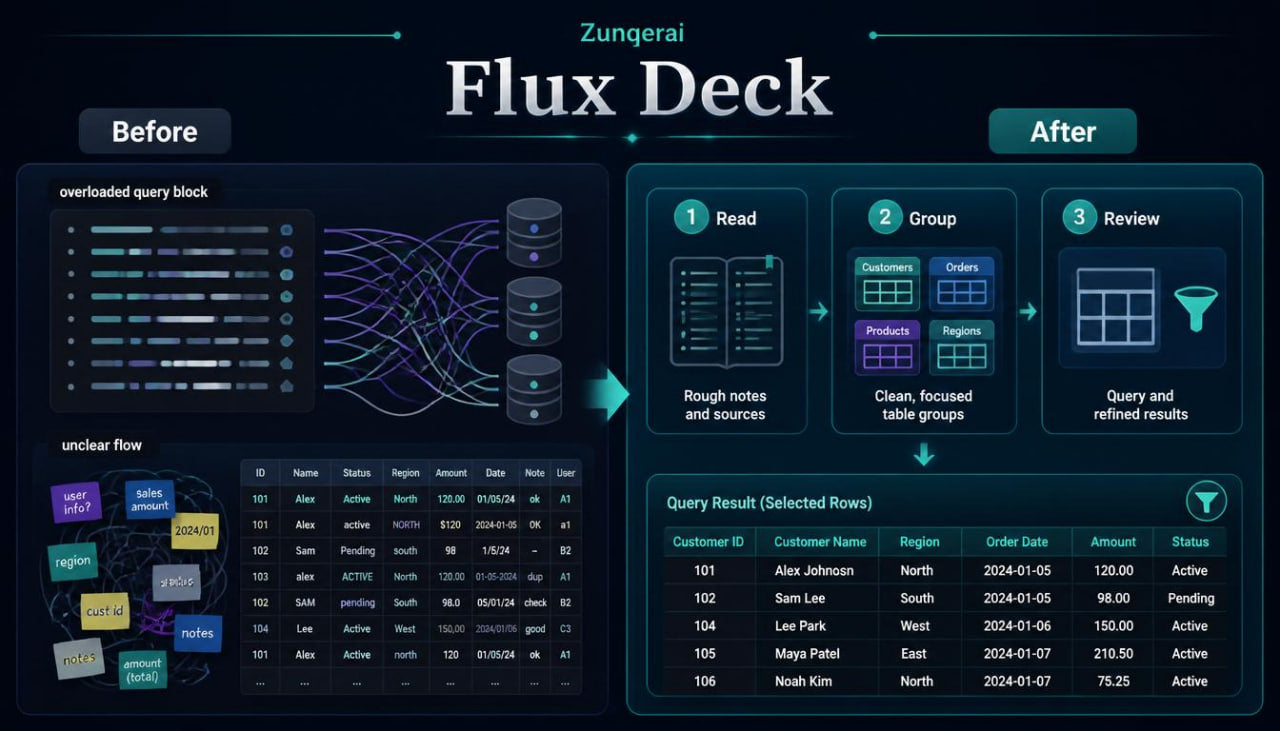
As database examples grow, learners often find that single-table thinking is no longer enough. A table may look organized alone, but the wider structure can become confusing when records connect across several tables. Query requests may also become harder to read when they include several conditions, sorted results, or related data. Learners may understand the terms but still need practice following the flow from raw notes to database layout and then to query output. Flux Deck is created for this stage, where learners need a deeper study layer focused on movement, connection, and review.
- Solution
Flux Deck gives learners a guided way to study how database parts interact. The materials show how rough information can be shaped into tables, how keys connect records, and how queries return selected views from stored data. Each topic is supported with examples, practice prompts, recap notes, and glossary-style explanations. The course does not rely on loud claims or pressure wording; it focuses on patient study and practical database reasoning. This tier helps learners connect planning choices with query behavior.
- What’s Inside
Flux Deck includes a detailed set of database learning materials centered on flow: how information is gathered, organized, connected, requested, and reviewed. The course begins with a structured review of earlier database foundations, then expands into multi-table thinking. Learners revisit tables, fields, records, primary keys, foreign keys, and relationships, but each topic is now presented through the question of movement: where does the information begin, where is it stored, and how is it read later?
The first main section focuses on information intake. Learners study rough notes, lists, and mixed data examples. These examples may include repeated names, unclear categories, combined details, missing values, or fields that try to hold too much information at once. The materials guide learners to examine the information before creating tables. This helps show why database planning begins with careful reading, not only with table creation.
The next section introduces table grouping in more depth. Learners practice deciding which details belong together and which details should be moved into a related table. A crowded list may be separated into a main table, a category table, a task table, or a linking table. The course explains how table grouping can make information easier to review and query later. Learners are asked to describe the role of each table in plain language before looking at keys or relationships.
Flux Deck also includes a detailed field review section. Learners study how each field should hold one type of information. The materials discuss common field issues such as unclear names, mixed values, repeated text, date inconsistency, and category overlap. Practice prompts ask learners to rewrite field names, split crowded fields, and decide whether a field belongs in the current table or another one. This section builds careful habits around database structure.
Keys are covered with added attention to flow between tables. Primary keys are described as record identifiers, while foreign keys are shown as reference points that connect related records. Learners study examples where one table sends a reference into another table through a foreign key. The course explains why this connection matters when reading related information or building a query that uses more than one table.
A central part of Flux Deck is relationship tracing. Learners follow connections from one record to another, then to a wider group of records. For example, one category may connect to several items, one learner may connect to several tasks, or one order may connect to several line entries. Many-to-many relationships are also reviewed through linking tables. The materials show how a linking table can hold pairs of references and explain why this structure is useful when both sides can have several connections.
The query section is broader than earlier tiers. Learners study how a query begins with a question, then moves through table choice, field choice, filtering, sorting, and result review. The course explains that a query result is not the full database; it is a selected view based on the request. This idea is repeated across examples so learners can separate stored records from returned results.
Filtering receives detailed attention. Learners examine single filters, paired filters, and grouped conditions. The materials include examples such as showing records with a certain status, selecting entries from one category, finding records after a certain date, or combining category and status conditions. Each example is written first as a plain-language request, then broken into smaller database thinking steps. This helps learners focus on logic before formal expression.
Sorting is also explored in relation to user questions. Learners study why the same records may be arranged in different ways depending on the goal. A result may be sorted by date for timeline review, by name for reading order, by number for comparison, or by category for grouping. Practice tasks ask learners to choose sorting fields and explain why that order fits the request.
Flux Deck introduces query paths across related tables. Learners see how a request may need information from more than one table. For example, a result may need a learner name from one table and task details from another table. The materials explain the role of shared keys in these situations. The goal is not to overload the learner with dense syntax, but to make the path between tables understandable.
Another section focuses on result checking. Learners are asked to read sample outputs and decide whether the result matches the original request. This part helps learners notice missing fields, extra rows, wrong sorting, or conditions that do not match the query goal. It also supports a useful study habit: checking the output against the question rather than stopping at the written request.
Flux Deck also includes a database cleanup section. This section introduces practical review tasks such as spotting duplicated details, checking whether categories are consistent, identifying fields that hold multiple meanings, and noticing values that should be moved into separate tables. Learners practice improving sample structures through written decisions.
The course contains several recap blocks. These blocks summarize information intake, table grouping, field review, keys, relationships, filtering, sorting, related-table queries, and result checking. A glossary section provides short explanations of important terms. Practice prompts appear throughout the materials, giving learners repeated opportunities to apply each topic.
The closing part of Flux Deck is a guided database flow example. Learners start with a rough information set, shape it into tables, define fields, mark keys, describe relationships, write query questions, choose filters, select sorting rules, and review a sample result. This final study path brings the course material together in one connected sequence.
- Who Is This For?
Flux Deck is for learners who already understand basic database structure and want to study how several parts work together. It may suit learners who have completed earlier Zunqerai tiers or who already know the meaning of tables, fields, records, and keys. This tier is useful for people who want more practice with relationships, query paths, and reviewing database results.
The materials are suitable for self-paced learners who prefer written modules, examples, task prompts, and review notes. They may be useful for students, team members, information organizers, assistants, or anyone who works with structured records and wants to improve database reasoning.
Flux Deck is not designed as a technical reference for every database situation. Its focus is study flow: reading information, shaping tables, connecting records, forming query requests, and checking results.
- What You Will Learn
- How to review rough information before creating tables.
- How to group details into table subjects.
- How to identify fields that need clearer naming.
- How to split crowded fields into cleaner parts.
- How primary keys support record identification.
- How foreign keys connect related records.
- How to trace one-to-many relationships.
- How to read many-to-many relationships with a linking table.
- How to turn a plain question into a database request.
- How to choose fields for a query result.
- How single and paired filters shape returned records.
- How sorting changes the order of results.
- How to follow query paths across related tables.
- How to check whether a result matches the original request.
- How to notice duplicated details and mixed values.
- How to review database flow through guided practice.
- 30-Day Refund Note
For paid Zunqerai tiers, a 30-day refund request window may be included in the store policy. Refund handling depends on the store’s written terms, order status, and file delivery conditions. Please read the refund policy on the store before placing an order. This note describes the refund process only and does not make claims about study outcomes.
Self-paced learning overview
- 🗂️ Digital file available after purchase
- 📚 Long-term availability
- 🔐 Secure checkout
- 📝 Content updated in 2026
What format are the Zunqerai materials provided in?
What format are the Zunqerai materials provided in?
Zunqerai database course materials are provided as digital learning files. They are created for reading, study, practice, and review at your own pace. The materials may include modules, written explanations, examples, tables, tasks, recap notes, and glossary-style sections. Each tier has its own content range and topic depth.
Do I need previous database knowledge before studying?
Do I need previous database knowledge before studying?
No previous database study is required for the starting tiers. Some tiers begin with basic ideas such as tables, fields, records, keys, relationships, and query structure. Wider tiers may include more detailed topics, so learners can choose the tier that matches their current study needs. The materials are written to support gradual learning through examples and practice.
How do I receive the materials after placing an order?
How do I receive the materials after placing an order?
After placing an order, the learning files are provided through the store’s delivery flow or order details message. The exact delivery method may depend on the store setup. You can use the provided files for personal study, reading, note-taking, and practice tasks. Each tier description explains what type of materials are included.
Share